
Expanding VM Disk in Proxmox with LVM
LVM (Logical Volume Manager) is a disk management system in Linux that adds a flexible abstraction layer between physical disks and filesystems. This guide covers how to expand a VM disk in Proxmox when using LVM inside the guest.
LVM Overview
LVM Structure (bottom to top)
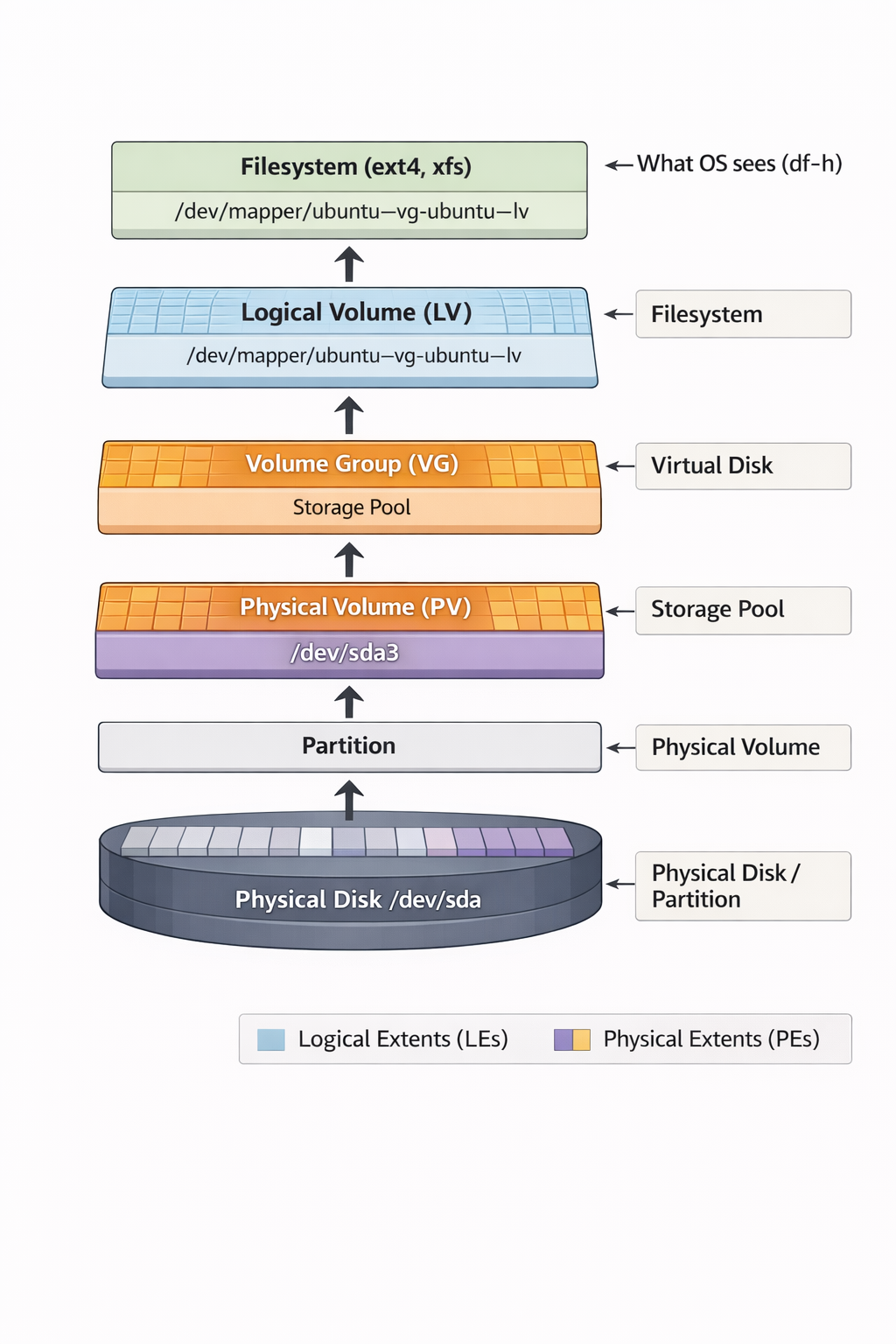
Three LVM Layers
- Physical Volume (PV) — physical volume (disk partition)
- Volume Group (VG) — volume group (pool of PVs)
- Logical Volume (LV) — logical volume (virtual disk)
Disk Expansion Process
Step 1: Resize Disk in Proxmox
Option A: Via Web UI
- Select your VM in the list.
- Go to Hardware tab.
- Click on Hard Disk (scsi0).
- Click Disk Action → Resize.
- Enter the amount to add, e.g.,
+20(adds 20GB). - Click Resize disk.
Option B: Via CLI on Proxmox Host
qm resize <vmid> scsi0 +20G
Step 2: Expand Partition and LVM Inside VM
# 1. Install growpart tool if not present
sudo apt-get update
sudo apt-get install -y cloud-guest-utils

# 2. Grow partition 3 to use all available space on sda
sudo growpart /dev/sda 3

# 3. Verify the partition is now larger
lsblk

# 4. Resize the physical volume to use the new partition space
sudo pvresize /dev/sda3

# 5. Check available space in volume group
sudo vgs

# 6. Extend the logical volume to use all free space
sudo lvextend -l +100%FREE /dev/mapper/ubuntu--vg-ubuntu--lv

# 7. Resize the ext4 filesystem
sudo resize2fs /dev/mapper/ubuntu--vg-ubuntu--lv

# 8. Verify the result
df -h
lsblk
Alternative Options for Step 6
# Add a specific amount
sudo lvextend -L +10G /dev/mapper/ubuntu--vg-ubuntu--lv

# Extend to a specific size
sudo lvextend -L 45G /dev/mapper/ubuntu--vg-ubuntu--lv
For XFS Instead of ext4 (Step 7)
sudo xfs_growfs /
Checking for LVM
# Check if LVM is in use
df -h | grep mapper
lsblk -f

# Physical Volume information
sudo pvs
sudo pvdisplay

# Volume Group information
sudo vgs
sudo vgdisplay

# Logical Volume information
sudo lvs
sudo lvdisplay
Important Notes
- All operations are safe and can be performed on a running VM
- No data loss
- No reboot required
- After
lvextend,resize2fsis mandatory, otherwise OS won’t see the new space - For XFS, use
xfs_growfsinstead ofresize2fs